Yearly Planner Quarterly Template 1: A Practical Framework for Long-Term Execution
Effective planning requires more than just a list of wishes for the coming months; it demands a structured system that bridges the gap between high-level vision and daily action. Yearly Planner Quarterly Template 1 is designed specifically to serve as that bridge. It moves beyond the traditional calendar view, offering a layout that divides the year into four distinct quarters. This approach allows professionals, entrepreneurs, and creators to segment their year into manageable phases, ensuring that goals are not only set but systematically approached through clear task management and priority setting.
Integrating Quarterly Planning into Your Workflow
The primary value of this template lies in its ability to fit seamlessly into an existing productivity workflow. Whether you are a freelancer managing client deliverables or a small business owner tracking product launches, the quarterly view provides a macro-level perspective that daily planners often lack. By using this template, you can visualize the trajectory of your projects over three-month increments. This is particularly useful when coordinating with teams or aligning personal development goals with business cycles. The layout acts as a central hub where high-level strategy meets actionable execution, ensuring that your daily tasks are always contributing to a larger quarterly objective.
Anatomy of the Template: Bullet Lists and Monthly Boxes
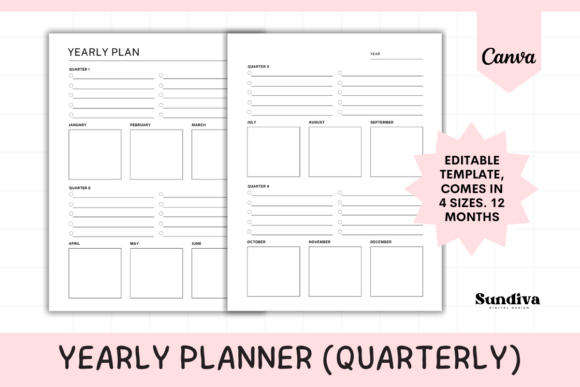
The design of Yearly Planner Quarterly Template 1 focuses on functionality and clarity. The layout is intentionally minimalist to prevent visual clutter, allowing you to focus on the content rather than the decoration. Each quarter is equipped with two main components: bullet list sections and empty monthly boxes.
The bullet list sections are intended for defining the overarching goals or "big rocks" for that specific quarter. This is where you identify the primary outcomes you wish to achieve. Below these lists, the empty boxes designated for each month provide the flexibility to break those goals down into specific tasks, deadlines, or milestones. This structure forces a natural progression from abstract planning to concrete scheduling. Unlike rigid pre-formatted templates, these empty boxes allow you to adapt the space to your specific needs—whether that means tracking habits, listing content ideas, or scheduling client meetings.
Practical Implementation: From Digital Edit to Physical Binder
One of the key advantages of this resource is its versatility in format. The template is available as an editable Canva file and as print-ready PDFs. This dual availability supports different planning styles and workflows.
For those who prefer a tactile experience, the PDF files are optimized for printing. You can select from US Letter, A4, A5, and Half Letter sizes, ensuring compatibility with almost any binder, planner cover, or journal system. Printing the template allows you to physically interact with your plan, which many find helps with retention and focus. Once printed, these sheets can be inserted directly into a ring-bound planner or disc-bound system, keeping your yearly overview alongside your weekly or daily inserts.
Conversely, the Canva template caters to the digital planner. If you use a tablet for planning, you can upload the template to Canva, edit the text fields, and export it as a PDF to import into apps like GoodNotes or Notability. This method allows for infinite reuse without the need for paper. To access the editable features, a free Canva account is required. While the Canva App on a phone is convenient for viewing, using a computer is highly recommended for the editing process to ensure precision when adjusting text and layout elements.
Workflow Example: The Quarterly Business Review
To understand how this template functions in a real-world scenario, consider the process of a Quarterly Business Review (QBR). At the end of a quarter, a business owner would typically review performance. Yearly Planner Quarterly Template 1 facilitates the next step in this cycle.
You would begin by opening the template to the upcoming quarter. In the bullet list section, you list the three to five major objectives derived from your review—perhaps "Launch Marketing Campaign," "Redesign Website," and "Hire New Assistant." You then move to the monthly boxes. In the first month's box, you list the initial steps for these projects, such as "Draft ad copy" or "Post job listing." As you move to the second and third month boxes, you map out the progression of these tasks. This visual mapping ensures that you are not overloading any single month and that dependencies between tasks are clear.
Compatibility and Long-Term Usability
A common pitfall in planning systems is the lack of consistency over time. However, because this template relies on a standardized quarterly structure, it promotes long-term use. You are not reinventing your planning system every few weeks; you are simply moving to the next page of a consistent framework. The clean, un-dated nature of the template means it can be used year after year. Whether you start using it in January or July, the structure remains relevant. This consistency reduces the cognitive load required to organize your life, allowing you to spend more energy on execution rather than administration.
Furthermore, the flexibility of the "empty box" design ensures that the template grows with you. A freelancer might use the boxes for client invoicing schedules in year one, and for content calendar planning in year two. The tool does not dictate how you work; it merely provides the structure to support your specific workflow.
Maximizing Efficiency with the Right Tools
To get the most out of Yearly Planner Quarterly Template 1, it is helpful to pair it with complementary tools. For instance, if you use a digital calendar (like Google Calendar or Outlook), you can use this template to plan the "what" and "why," while the digital calendar handles the specific time-blocking of those tasks. The template serves as the strategic overview, while your digital calendar manages the tactical execution.
Similarly, if you are using this template for creative projects, it pairs well with mind-mapping tools. You might brainstorm a project in a mind map and then transfer the finalized structure into the quarterly template’s bullet lists and monthly boxes. This creates a clear workflow from ideation to implementation. By using the template as the central organizing document, you ensure that no idea gets lost and every project has a designated timeline for completion.
Ultimately, this planner is about clarity. It strips away the unnecessary complexity of modern planning tools, offering a straightforward, printable, and editable solution for anyone serious about achieving their goals. Whether you are planning a corporate strategy or a personal creative endeavor, the structure provided by Yearly Planner Quarterly Template 1 ensures that your plans remain organized, visible, and actionable throughout the year.