10 Business Outline Icons Bundle: Practical Visuals for Every Project
In the fast-paced world of digital communication, clarity is currency. Whether you are building a mobile application, designing a corporate website, or preparing a pitch deck for investors, the visual assets you choose define how your audience perceives your competence. The 10 Business Outline Icons Bundle is not just a collection of images; it is a toolkit designed to bridge the gap between abstract business concepts and concrete visual understanding. By focusing on clean line work and universal business themes, this bundle offers a streamlined solution for creators who need to communicate complex ideas instantly.
Anatomy of the Collection
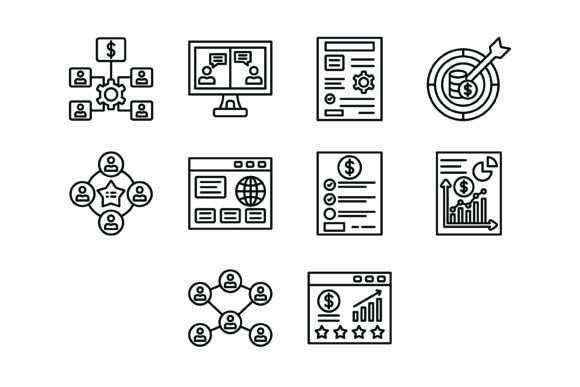
Understanding the specific contents of this bundle is the first step toward utilizing it effectively. This pack includes ten distinct vector icons, each representing a fundamental pillar of modern business operations. The selection is curated to cover the lifecycle of a business interaction, from the initial strategy phase to the final customer feedback loop.
The ten icons included are:
- Organization Icon: Representing structure, hierarchy, or corporate identity.
- Online Chat Icon: Symbolizing customer support, real-time communication, and instant messaging.
- Project Management Icon: Visualizing the planning, execution, and monitoring of tasks.
- Target Icon: Denoting goals, KPIs, and precision in marketing strategies.
- Teamwork Icon: Illustrating collaboration, synergy, and human resources.
- Browser Icon: Representing web development, internet presence, and digital interfaces.
- Price List Icon: Indicating commerce, pricing structures, and financial planning.
- Bar Chart Icon: Essential for data visualization, analytics, and growth reporting.
- Connectivity Icon: Symbolizing networking, API integrations, and global reach.
- Ratings Icon: Used for user reviews, quality assurance, and social proof.
The Power of Vector Formats
One of the most critical aspects of this bundle is its technical versatility. The package includes five different file formats: AI, EPS, JPG, PNG, and SVG. For the modern designer, this variety is not a luxury but a necessity. The inclusion of SVG (Scalable Vector Graphics) and EPS formats ensures that the icons remain crisp and clear at any size. Whether you are scaling the Target Icon down for a mobile app footer or blowing up the Bar Chart Icon for a trade show banner, the lines remain sharp.
Furthermore, the transparent background versions (specifically the PNGs) allow for seamless integration into existing designs without the hassle of masking or cropping. This "ready to use" nature significantly speeds up the workflow, allowing entrepreneurs and freelancers to focus on strategy rather than pixel manipulation.
Practical Applications for Diverse Audiences
The true value of a design asset lies in its adaptability. This bundle is designed to be "platform agnostic," meaning it functions just as well in print as it does in digital environments. Here is how different professionals can leverage these assets:
For Web Designers and Developers
When designing a user interface, consistency is key. Using the Browser Icon and Online Chat Icon within a dashboard design creates an intuitive navigation experience. The outline style is particularly effective here because it does not overwhelm the user interface. It provides visual cues that guide the eye without competing with the data or text content. You can easily use these icons to denote "Settings," "Help Center," or "Analytics" tabs.
For Marketing and Content Strategy
Bloggers and content marketers often struggle to break up long walls of text. Inserting the Organization Icon or Ratings Icon within a blog post can serve as visual anchors that summarize the paragraph's point. For a small business owner creating a "Services" page, using the Project Management Icon next to a list of service offerings adds a layer of professionalism and structure that plain text cannot achieve.
For Educators and Presenters
In an educational context, visual aids are proven to improve retention. Educators creating slide decks can use the Teamwork Icon to highlight collaborative exercises or the Connectivity Icon to explain networking concepts. Because the icons are designed for "maximum usability," they are legible even from the back of a conference room when projected on a screen.
Creative Interpretations and Customization
While the bundle is "ready to use," creative professionals often need to adapt assets to fit specific brand guidelines. The vector nature of these files allows for complete customization. You are not locked into a specific color palette or stroke weight.
Consider these creative variations:
- Color Psychology: Change the stroke color of the Price List Icon to green to subconsciously suggest money and growth, or change the Target Icon to red to imply urgency.
- Stroke Weight: If you are designing for a luxury brand, you might want to thin out the lines of the icons to create a more elegant, minimalist aesthetic. Conversely, thickening the lines can make the icons feel more robust and industrial.
- Animation: For web designers, these SVGs are perfect candidates for micro-animations. Imagine the Connectivity Icon pulsing gently to show a live connection, or the Online Chat Icon bouncing to draw attention to a support button.
Ensuring Visual Consistency
A common pitfall in design is mixing icon styles—pairing a detailed, realistic icon with a flat, minimalist one. This bundle solves that problem by providing a cohesive set. The 10 Business Outline Icons Bundle shares a unified visual language. When you use the Teamwork Icon alongside the Organization Icon, they feel like they belong to the same family. This consistency builds trust with your audience; it signals that you pay attention to details and value a polished presentation.
To maintain this consistency, it is recommended to establish a set of rules before applying the icons. Decide on a fixed size for body text integration versus header integration. Ensure that the color of the icon matches the primary or accent color of your brand palette. By treating these icons as a system rather than individual images, you create a more cohesive user experience.
Conclusion
The 10 Business Outline Icons Bundle serves as a practical foundation for visual communication in the business world. By combining universal symbols like Ratings and Bar Charts with flexible file formats, it empowers creators to build more organized, visually appealing, and effective projects. Whether you are building a complex app or a simple brochure, these icons provide the clarity and professionalism required to make your message resonate.